coyote notifications
Coyote alerts are about one idea awareness changes outcomes. When you know what is moving through your neighborhood you gain the freedom to choose when to step outside when to call your kids in when to protect the pets who trust us completely. This is not about fear and it is not about fighting nature. It is about responsibility. A community that pays attention is a community that cares. Every shared sighting is a small act of leadership a small action that says you are not alone we are watching out for each other. This is how safety is built not through force but through participation. When we show up for one another we create safer streets calmer routines and a smarter way to coexist together.
SET UP YOUR COYOTE ALERTS
Knowing where coyotes are helps you protect your pets, plan your routes, and stay aware without freaking out.
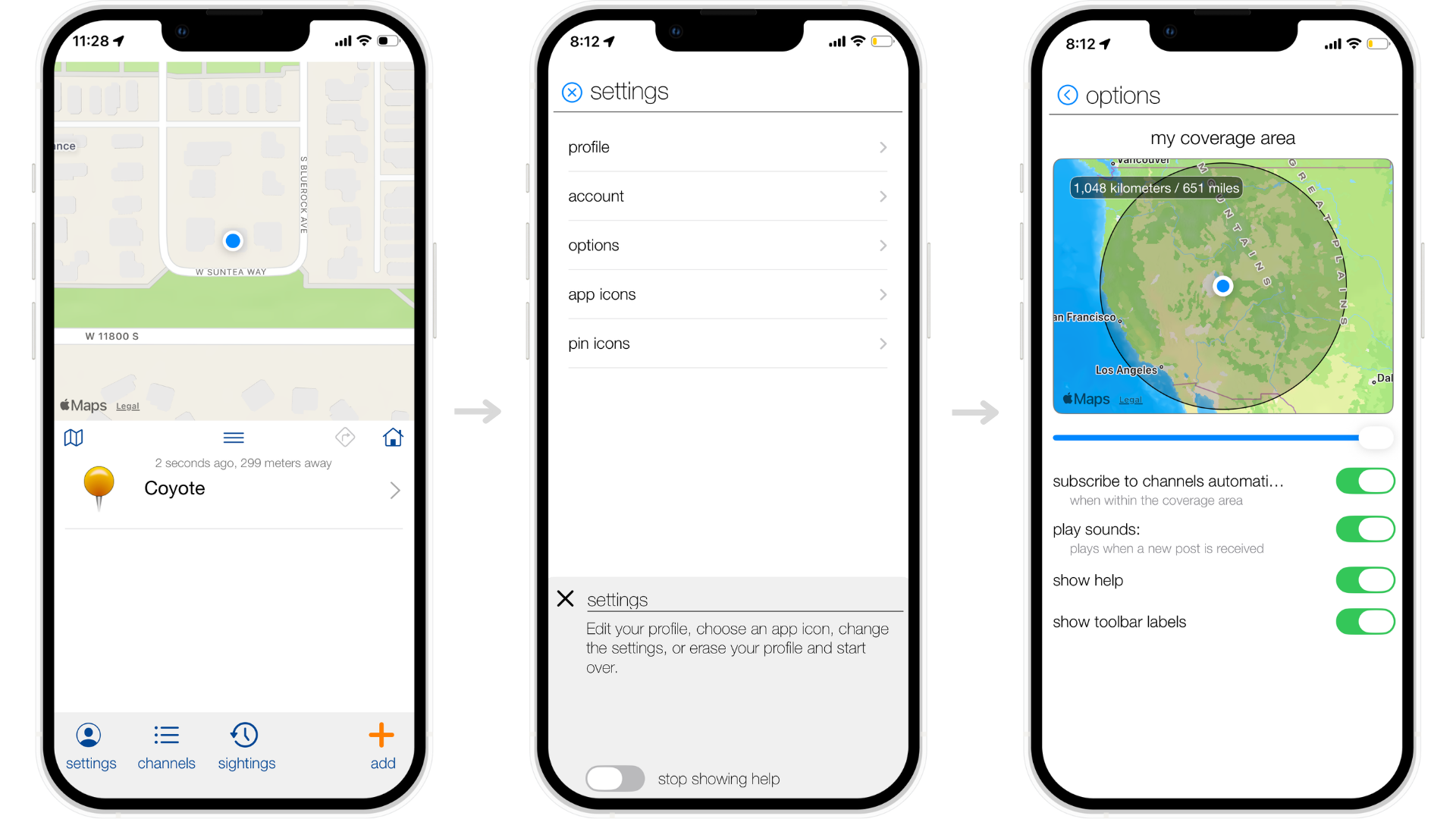
Step 1 Open the App
Open Coyote Maps.
Step 2 Go to Settings
Tap Settings. This is where you control your alerts.
Step 3 Turn On Coyote Alerts
Switch alerts on so you get notified when coyotes are nearby.
Step 4 Choose Your Coyote Alert Area
Pick the area you want to hear about coyotes in.
Keep it small if you only care about what is close.
Make it bigger if you move around or want the full picture.
Step 5 Set How Close Is Close
Use the slider to decide when a coyote sighting should notify you.
Step 6 Change It Anytime
Life changes. Your alert area can too.